
One Work Order for Every Equipment Rental
November 20, 2026
Equipment rentals don't fit the way work orders are built
A rented light tower, generator or chiller is rarely a one-day job. It arrives, gets put to work, runs for months, and bills every month until it leaves. Most CMMS platforms were built to track owned assets and one-time work from specialty trades, so a rental ends up scattered across multiple work orders and tracked on a spreadsheet or ERP system that nobody fully trusts.
The cost lands on every side. Rental companies chase paperwork to bill what they are owed. Facility managers can't see everything tied to one rental in one place. Multi-site teams juggle several CMMS platforms, each with its own rules for work orders, IVR check-ins and how to classify a rental to capture the costs correctly.
RentAPI™ is an embedded rental work order layer designed to work alongside the CMMS your team already uses. It is not a standalone CMMS, but an integrated middleware that provides the rental workflow those systems lack. The platform is built around four ideas: one work order for the whole rental, no manual re-submission, one way for technicians to check in, and vendor performance you can actually compare.
One work order, many invoices
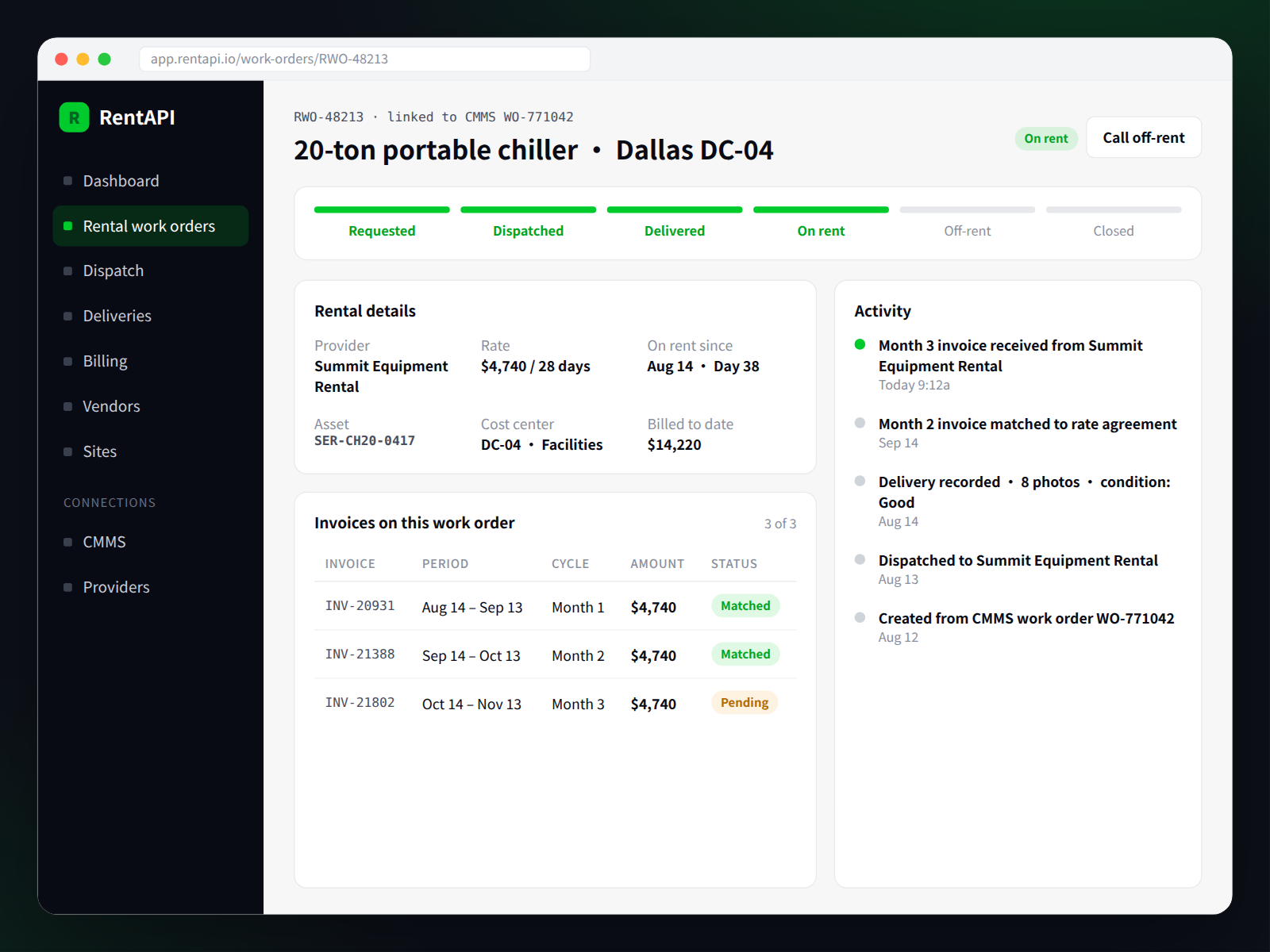
The core idea is simple: a rental is one job, so it should live on one work order, even when it bills for many months.
RentAPI is designed to keep a single work order open for the life of the rental and attach each sequential monthly invoice to it. Nothing has to be reopened or recreated when a new billing period starts.
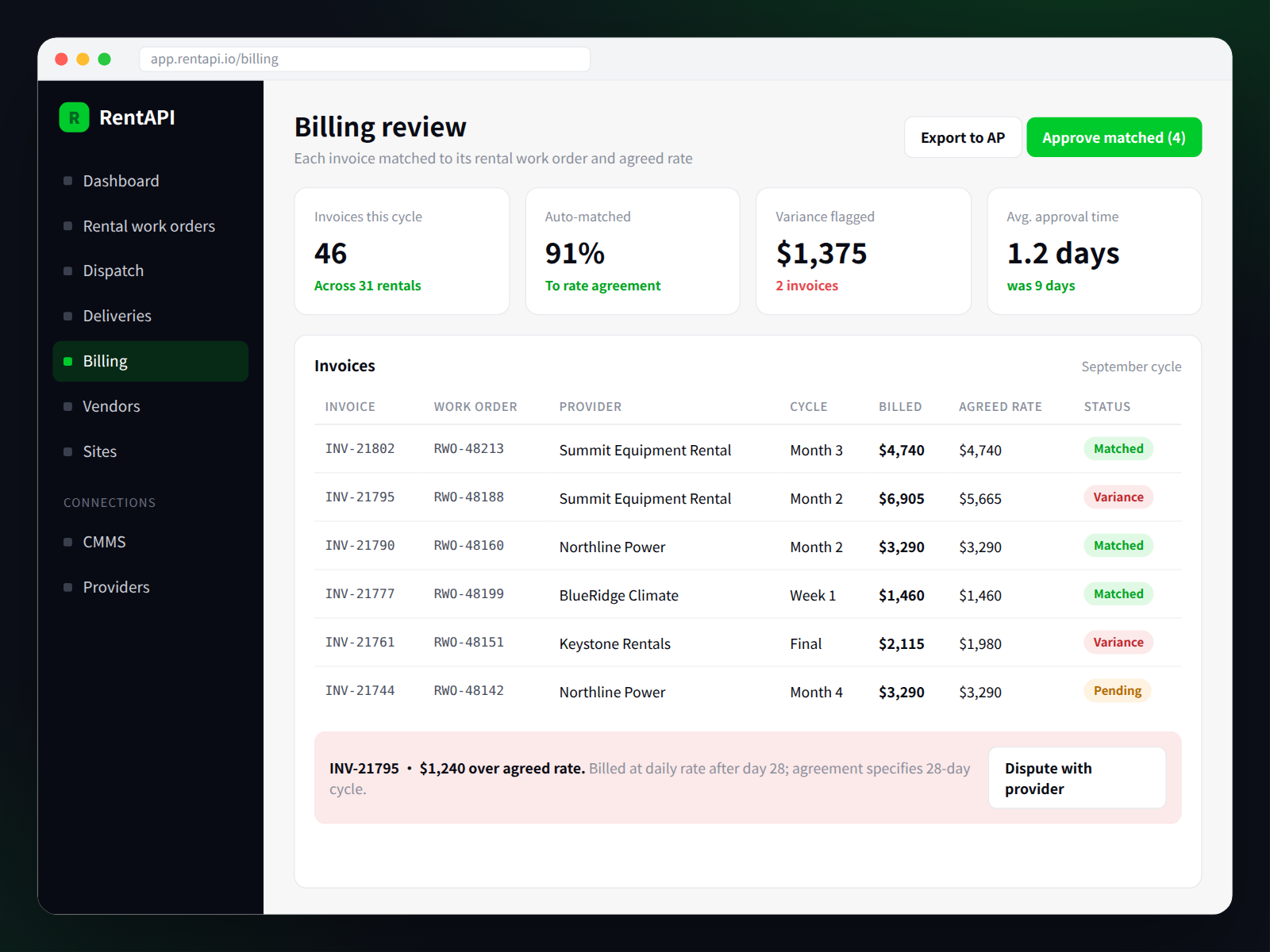
For equipment rental companies, that means monthly recurring revenue is captured as the rental continues, instead of depending on someone remembering to start a new work order each month. Invoices that follow one another stay linked to the same job, which makes it easier to bill what was actually on rent.
For facility managers and their teams, everything related to a rental sits in one place: the equipment, its check-in and condition records, and every invoice. Questions like "what have we paid on this unit, and is it still needed?" have one answer to look up, not several to piece together.
Less manual submission, fewer repeated steps
Today, a long rental often means the same chore every month: create a new work order, key in the details again, submit the invoice, and hope it is submitted correctly to avoid disputes. Each repeat is a chance for a typo, a missed month or a delayed payment.
Because RentAPI is designed to carry one work order across the whole rental, that monthly loop goes away. The invoicing side is where teams should feel it most:
- No new work order for each month of a rental.
- No re-entering the same equipment and site details every billing cycle.
- No separate submission step to get each invoice in front of the facility team.
For rental providers, that means less back-office time and faster, more predictable billing. For facility teams, it means fewer duplicate records to reconcile and fewer invoices arriving without context. The work people used to do by hand is the part RentAPI is built to take off their plate, creating more efficient workflows.
One IVR check-in for every technician
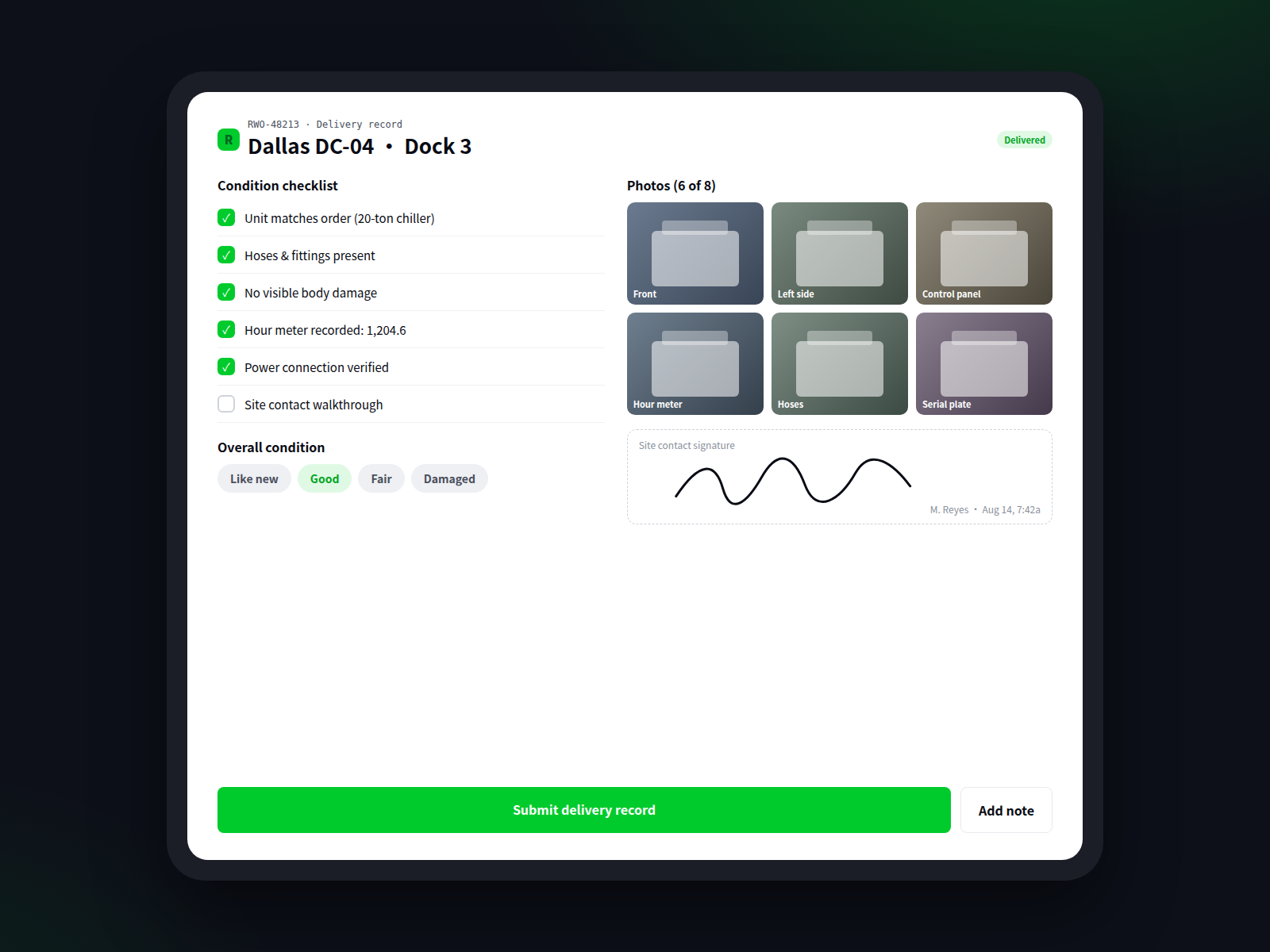
When equipment arrives on site, a technician needs to record that it was delivered and installed. That check-in is the proof both sides rely on later, for billing, for damage questions and for the end of the rental.
The trouble starts when a team runs more than one CMMS. Each platform has its own IVR method, its own steps and its own processes. A technician who covers several sites may need to remember a different process for each one, and the record they leave is only as consistent as their memory that day. Imagine the frustration of a field technician when they have to perform 3 different forms of IVR across three different installs.
RentAPI is designed to give field technicians one uniform way to enter IVR check-in data, no matter which CMMS the site uses. The same steps capture delivery and equipment condition every time, and the information goes to the right work order.
The benefits are practical:
- Technicians learn one process, not several, and spend less time on the phone or in an app.
- Facility teams get consistent check-in records across every site and platform.
- Rental providers get clearer evidence of delivery and condition, which helps resolve billing and damage questions faster.
Vendor grading you can act on
Choosing a rental provider usually comes down to relationships and gut feel. Facility managers rarely have a clean, honest, side-by-side view of how each vendor really performs, and for teams spread across many sites, the data sits in separate systems.
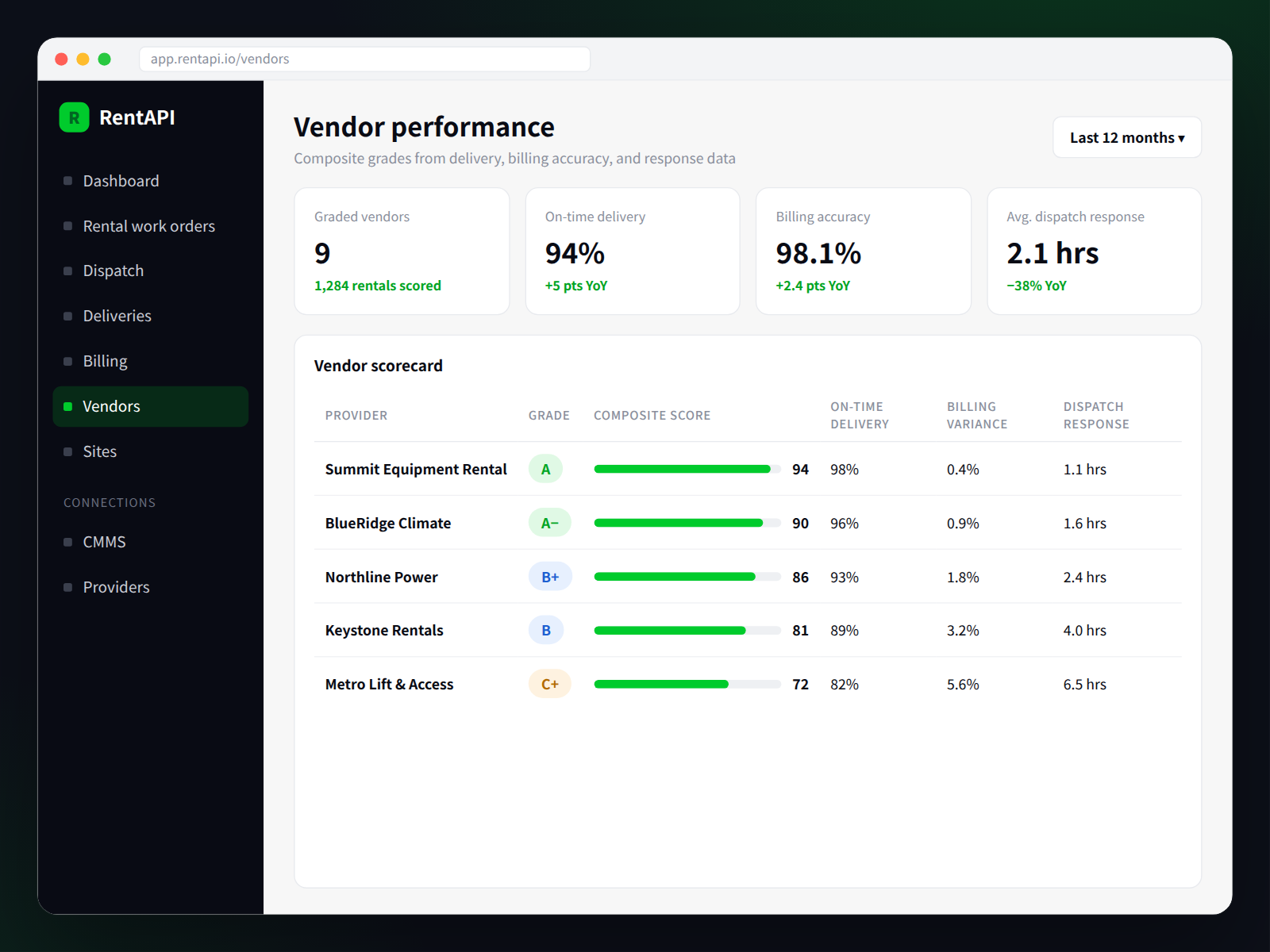
Because RentAPI is designed to sit on the work order for every rental, it can also record how each rental went. That is the basis for vendor grading metrics: real-time KPIs on rental providers that facility managers and multi-site teams can review in one place.
With that view, a team can ask better questions:
- Which provider delivers on time, and which one doesn't?
- What does our cost allocation look like across each provider?
- Which partner is the best fit for this specific rental need, at this site?
The result is a more informed decision on who to call next. For strong rental providers, it is also a fair way to be recognized for good service, because performance is measured on the same work orders that run the rental, not on anecdotes.
What it means for your business
For equipment rental providers, monthly invoice revenue is captured on one work order, allowing for less back-office re-entry and faster, more predictable billing.
For facility managers, everything about a rental is logged in one place, which means fewer duplicate records and clear visibility into what you are paying for.
For multi-site CMMS users, your equipment rentals across multiple CMMS systems are tracked in one place, and measured across your top vendors to provide the best outcome for your clients.
RentAPI works alongside the CMMS you already run. It is not a replacement and it is not affiliated with any CMMS platform. It adds the rental layer that those systems weren't built to provide, so teams can drop the swivel-chair work of re-entering the same rental in several places.
If you rent equipment, manage facilities, or run more than one CMMS and want to see how this could fit your workflow, we would like to hear from you. Email info@rentapi.io or visit rentapi.io to learn more.